
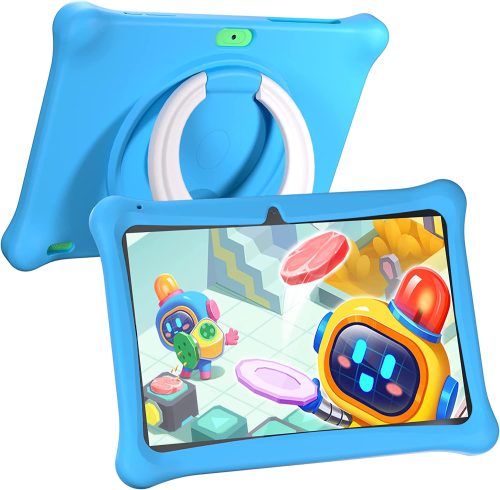
Check out our detailed SGIN Kids Tablet Review, exploring the product’s design, functionality, user experiences, and more. Find out why this tablet is a standout choice in the kids’ electronics market.
The SGIN Kids Tablet serves as an interactive, educational tool designed to engage children in a wide range of learning activities, while providing essential digital skills for the modern age.
This 10-inch Android 12 tablet includes an impressive 2GB RAM and 32GB storage, making it a competent device for kids.
Featuring a parental control app, dual camera, Wi-Fi capabilities, and pre-installed educational games, this tablet is far more than a simple toy – it’s an effective learning platform that offers both fun and instruction.
How does the SGIN Kids Tablet Work?
Setting up the SGIN Kids Tablet is remarkably easy. It comes pre-loaded with the Android 12 operating system and a range of educational games, with the option for parents to download additional apps via Google Play.
The included parental control app, iWawa, allows parents to manage content, set time limits, and ensure their children are accessing age-appropriate material.
This unique app offers a safe environment where kids can learn, play, and develop important digital skills.
Detailed Setup Guide for the iWawa Parental Control App
The iWawa app on the SGIN Kids Tablet provides robust parental controls, allowing parents to monitor and control their child’s usage. Here’s a detailed guide on how to set it up:
Step 1: Launch the iWawa App
When you turn on the SGIN Kids Tablet, you’ll see the iWawa app icon on the home screen. Tap on it to launch the app.
Step 2: Set up Parental Control
The first time you launch the app, you’ll be asked to set up parental control. You’ll need to create a password. Make sure it’s something secure, but easy for you to remember as you’ll need it to change settings or exit the child mode.
Step 3: Create a Profile for Your Child
Once you’ve set your password, you’ll be prompted to create a profile for your child. You can enter their name, select an avatar, and set the age range appropriate for your child. The age setting will influence the kind of content the system recommends.
Step 4: Set Daily Playtime Limit
One of the best features of iWawa is the ability to control how long your child uses the tablet each day. You can set the playtime limit in the settings under ‘Child Settings’ then ‘Daily Playtime Limit’. Set a reasonable time that you feel comfortable with.
Step 5: Choose Accessible Apps
iWawa also allows you to control what applications your child has access to. Under ‘Child Settings’, there’s an option ‘Choose Apps for Kids’. Here you can select which installed apps your child can use.
Step 6: Control Internet Access
Under the same ‘Child Settings’, there’s an option to ‘Allow Web Access’. If enabled, you can specify certain websites that your child can visit, creating a safe browsing environment.
Step 7: Exit Child Mode
To exit the child mode, simply tap on ‘Parents’ or ‘Settings’ at the top right of the screen. You’ll be asked to enter your password. After doing so, you can manage settings or exit the iWawa app.
Remember, it may take some time to familiarize yourself with the iWawa app’s features and settings. Don’t hesitate to explore different options and adjust settings as necessary to match your child’s changing needs.
With iWawa, you’re in control, making the SGIN Kids Tablet a safe and educational tool for your child.

Navigating the Interface
Navigating the SGIN Kids Tablet is intuitive, even for young users. The home screen displays large, colorful icons for pre-installed apps and games.
The tablet is touch-sensitive and responds quickly, allowing kids to tap, swipe, and scroll with ease. It also includes a dual camera feature, letting your child explore photography and videography from a young age.
Design and Quality of the SGIN Kids Tablet
The SGIN Kids Tablet is designed with children in mind. Its 10-inch screen provides an ample viewing area, while the 1280×800 IPS display delivers clear and vibrant images.
The tablet itself is housed in a sturdy, child-friendly case made from durable, non-toxic materials. The case is designed to withstand accidental drops and spills, providing a sense of security for both parents and kids.
Available in a playful blue color, this tablet is as visually appealing as it is functional.
In-depth Analysis: Features, Functionality, and User Benefits
Key Features and Functionality
The SGIN Kids Tablet is a powerhouse of features. Its 2GB RAM and 32GB storage offer sufficient space and speed for most children’s applications.
It also comes with Wi-Fi capabilities, making it easy for children to access online learning materials under parental supervision.
One of the most distinctive features of this tablet is its iWawa pre-installed app. This parental control software allows parents to manage their child’s digital activity effectively, setting time limits, and ensuring access to age-appropriate content.
Another great feature is the dual camera. This allows kids to explore their creativity through photos and videos. The tablet’s audio quality is also commendable, making it ideal for interactive learning, music, and videos.
User Benefits
The primary benefit of the SGIN Kids Tablet is the balanced blend of education and entertainment it provides.
It encourages children to engage with technology in a positive, controlled manner, while sparking creativity, enhancing cognitive skills, and promoting independent learning.
Comparisons with Similar Products
Compared to other children’s tablets in the market, such as the Amazon Fire Kids Edition or the LeapFrog Epic Academy Edition, the SGIN Kids Tablet offers an outstanding balance of features and price.
While both Amazon and LeapFrog tablets also offer parental controls and pre-installed apps, the SGIN tablet boasts a larger screen, increased RAM and storage, and a dual camera – all at a competitive price point.
Pros and Cons of the SGIN Kids Tablet
Pros
- Easy to use and navigate, even for young children.
- Solid construction, durable case, designed to withstand accidental drops.
- Pre-installed iWawa app offers excellent parental control features.
- High storage capacity and good performance.
- Dual camera stimulates creativity.
Cons
- Only available in one color.
- Parental controls may be difficult to understand initially.
Why the SGIN Kids Tablet is Better Than Other Products
The SGIN Kids Tablet stands out in the crowded market of children’s tablets due to its superior features, user-friendly design, and competitive price.
It provides more than just a digital plaything; it offers a comprehensive learning platform that caters to various interests and age groups.
User Experiences and Testimonials
In the vast online marketplace, it’s important to consider the experiences of those who have purchased and used the SGIN Kids Tablet.
Testimonials and user reviews offer valuable insights into the tablet’s performance in real-life scenarios. From durability to usability, here are a few notable remarks from genuine users:
Learning Made Fun and Easy
Many parents noted that the SGIN Kids Tablet makes learning interactive and enjoyable. One user said, “My six-year-old loves her new tablet. She enjoys the pre-loaded educational games, and I appreciate how they make learning fun for her. The math and language arts games are her favorites!”
Another parent remarked, “The tablet’s educational content is on point. It’s been great to see my child learning and having fun at the same time. I have noticed significant improvement in his problem-solving and critical thinking skills.”
Parental Control: A Big Plus
The iWawa parental control app has been a hit among parents. One user stated, “The parental control features are fantastic. I can set time limits and even manage what content my daughter can access.
It’s also useful to see what she spends the most time on. It gives me peace of mind knowing she’s in a safe digital environment.”
However, some users mentioned a slight learning curve with the iWawa app. One parent said, “It took me a bit of time to figure out how to set everything up on the iWawa app.
But once I got the hang of it, it was a breeze. The control it gives me over my child’s tablet use is invaluable.”
Resilience and Durability
The tablet’s durability has also been a recurring highlight in user reviews. One user said, “The kid-proof case is a lifesaver! My son has dropped his tablet a few times, but it’s still working perfectly. The case really protects the device.”
Room for Creativity
Many kids seem to love the dual camera feature. One parent mentioned, “My daughter loves the camera on her tablet. She has been taking pictures of everything and making funny videos. It’s great to see her expressing her creativity this way.”
Value for Money
The consensus among users is that the SGIN Kids Tablet provides good value for money. One user said, “Considering the features and the quality of this tablet, it’s definitely worth the cost. It’s not just a toy; it’s a learning tool that grows with my child.”
While most of the user reviews are positive, it’s important to remember that experiences can vary.
Some parents noted they had to spend some time getting used to the tablet’s features, but overall, the feedback indicates that the SGIN Kids Tablet is a reliable, user-friendly, and effective learning tool for kids.
You may also be interested in our Ddidbi Smart Watch Review.
Tips and Tricks for Users
Maximizing the benefits of the SGIN Kids Tablet means understanding its features fully and using them creatively. Here are some tips and tricks that can help you and your child get the most out of this dynamic learning tool:
Leverage the Parental Control App
The iWawa app offers fantastic parental control features. Don’t just set time limits; also use it to explore the range of age-appropriate content available.
Try to understand your child’s interests and learning style, then use the app to provide access to apps and games that align with these preferences.
Explore Google Play
While the tablet comes pre-loaded with numerous educational games, the Google Play Store hosts an array of apps to suit all interests and age groups.
From science and math games to creative art apps, take the time to explore and download additional content that can enhance your child’s learning experience.
Make Use of the Camera
The tablet’s dual camera isn’t just for fun; it can be an excellent learning tool. Encourage your child to document their surroundings, start a photo journal, or even make short films.
These activities can boost creativity and introduce them to basic photography and filmmaking concepts.
Encourage Safe Internet Browsing
As your child grows older, they’ll likely want to explore the internet. Use this opportunity to educate them about safe browsing habits.
Teach them about the importance of not sharing personal information online, recognizing reputable sources, and using safe search filters.
Regular Device Maintenance
Encourage good digital habits by teaching your child about device maintenance. This includes charging the tablet properly, keeping it clean, and closing unused apps to preserve battery life and device performance.
Involve Yourself in Your Child’s Learning Journey
Take time to sit with your child and engage with them while they are using the tablet. This not only allows you to monitor their interactions but also provides an opportunity for bonding and co-learning.
You can discuss the games they are playing, ask about what they are learning, and encourage them to think and reflect.
Using the SGIN Kids Tablet effectively involves more than just handing the device to your child. By exploring its features, choosing appropriate content, and involving yourself in your child’s digital learning journey, you can truly make the most of this educational tool.
Frequently Asked Questions about the SGIN Kids Tablet
Navigating the world of children’s tablets can be challenging. To assist you further, here are some FAQs and their answers regarding the SGIN Kids Tablet:
How durable is the SGIN Kids Tablet?
Thanks to its sturdy construction and protective case, the tablet is designed to withstand typical child play, including accidental drops.
Can I add more apps to the tablet?
Yes, the SGIN Kids Tablet comes with Google Play, so parents can download additional child-friendly apps.
Can the tablet connect to Wi-Fi?
Yes, the tablet has Wi-Fi capabilities, allowing your child to access the internet under parental supervision.
What age group is the SGIN Kids Tablet suitable for?
The SGIN Kids Tablet is designed for kids aged 3 to 12. It comes with a variety of pre-installed educational games suitable for different age groups, and its user-friendly design makes it accessible for young children.
Does the SGIN Kids Tablet have Bluetooth connectivity?
Yes, the SGIN Kids Tablet comes equipped with Bluetooth connectivity. This allows you to connect compatible devices such as headphones or speakers, which can be particularly useful for educational apps that utilize audio.
How do I set up the iWawa parental control app?
Setting up the iWawa app involves creating a profile for your child and specifying the appropriate settings for content, screen time, and so on. It may take a little time to explore all the options, but the controls are intuitive. For further guidance, the user manual offers detailed instructions.
Can I expand the tablet’s storage capacity?
Yes, the SGIN Kids Tablet comes with an expandable storage option. If the default 32GB is not enough, you can insert a MicroSD card of up to 128GB to increase its capacity.
Is the tablet’s case removable?
Yes, the protective case that comes with the SGIN Kids Tablet is removable. However, for the tablet’s safety, it’s recommended to keep the case on, especially when your child is using the device, to protect it from accidental drops and spills.
Can my child access YouTube on this tablet?
Yes, with Wi-Fi connectivity, your child can access YouTube under your supervision. However, for a safer experience, it’s recommended to use YouTube Kids, which offers age-appropriate content.
Can the SGIN Kids Tablet connect to a home network printer?
As long as your home network printer supports Google Print services, you should be able to connect the SGIN Kids Tablet to it. This can allow your child to print out their drawings or worksheets directly from the tablet.
SGIN Kids Tablet Review – Conclusion
Deciding on a piece of technology designed for your child’s learning and enjoyment can feel like an overwhelming responsibility.
It’s not just about finding a gadget that will keep them entertained; it’s about sourcing a tool that aids in their educational development while offering robust safety features.
In this context, the SGIN Kids Tablet emerges as a compelling choice.
The tablet is engineered with a primary focus on interactive learning. With an extensive range of pre-installed educational games and the ability to download more from the Google Play Store, it offers a versatile platform for various age-appropriate learning experiences.
Whether it’s math, language arts, or creativity, the SGIN Kids Tablet has content that caters to a broad spectrum of interests and abilities.
The iWawa app, with its robust parental control features, allows parents to create a safe digital environment for their children.
While it may take some time to understand all its features, the level of control it offers over a child’s digital consumption is a key highlight.
The ability to limit usage time, control content accessibility, and monitor usage trends helps ensure a healthy balance of entertainment and learning.
A significant advantage of the SGIN Kids Tablet is its thoughtful design and durability. The tablet is constructed to endure the rigors of child play, and the protective case offers an added layer of resilience against accidental drops.
Despite being robust, the tablet remains user-friendly with an intuitive interface that even young children can navigate with ease.
One of the aspects that genuinely sets the SGIN Kids Tablet apart from other products in the market is the inclusion of a dual camera.
This feature encourages children to explore their creative side and engage with the world around them in novel ways.
While most user reviews are glowing with praise, it’s essential to recognize the slight learning curve associated with mastering the parental controls.
Nonetheless, the general consensus among users is that the tablet is a worthwhile investment, providing excellent value for money.
Not only does it entertain and educate, but it also grows with your child, making it a long-term companion in their learning journey.
In conclusion, the SGIN Kids Tablet stands as an exceptional blend of learning, fun, and safety. It provides an engaging platform for children to explore, learn, and create, while parents can rest easy knowing their child’s digital consumption is in a controlled and secure environment.
While no product is without its minor drawbacks, the benefits of this tablet for a child’s development and digital literacy make it a valuable investment for any parent.
It is especially recommended for those who want to introduce their children to the digital world in a safe and educational manner.