
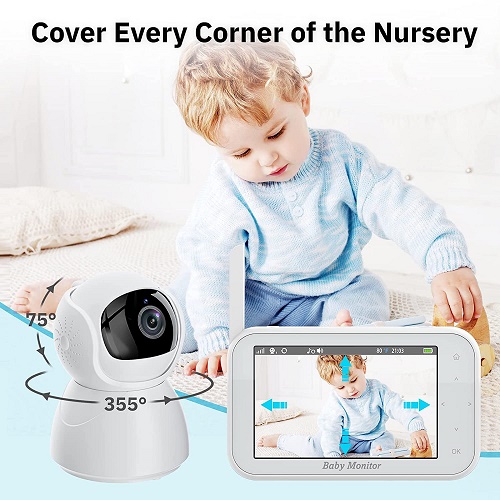
Dive into our INHOSP Baby Monitor with Camera Review to learn about the key features, quality, pros and cons and frequently asked questions about the Inhosp baby monitor.
The INHOSP Baby Monitor is a comprehensive solution for new parents looking to stay connected with their infants. The package comes complete with a 4.5-inch color LCD display monitor and a camera equipped with Pan, Tilt, and Zoom (PTZ) capabilities.
Designed to keep you updated about your baby’s safety, the monitor offers a two-way communication feature, automatic night vision, VOX mode, temperature monitoring, and even a lullaby player to soothe your child to sleep.
Inhosp Baby Monitor with Camera Review – How To Use
Setting up and using the INHOSP Baby Monitor with Camera is fairly straightforward. Follow the steps below to ensure a smooth and successful setup:
Step 1: Unpack the Baby Monitor
Unbox the INHOSP Baby Monitor package. Inside, you should find a monitor unit, a camera unit, two power adapters, and a user manual.
Step 2: Power Up the Units
Plug in the power adapter to the camera unit and another one to the monitor unit. Ensure that both units are properly connected to power and start to power up.
Step 3: Pair the Units
The monitor and camera units should pair automatically. If not, go to the menu on the monitor, select “Pair” and follow the on-screen instructions to pair the camera. You should see the camera’s view on your monitor’s screen.
Step 4: Position the Camera
Place the camera in a secure position in your baby’s room. It should be at a safe distance from the crib and on a flat surface where it can’t be easily knocked over. Adjust the camera’s angle to get a good view of your baby.
Step 5: Test the Monitor
Once the camera is in place, test the monitor from various locations in your house to ensure the connection is stable. Check the video feed, try adjusting the camera angle using the monitor controls, test the two-way talk function, and make sure all the features are working as they should.
Step 6: Configure Additional Settings
You can adjust the settings on the monitor according to your preferences. This includes temperature alerts, VOX mode sensitivity, and lullaby selection. Follow the user manual for detailed instructions on how to adjust these settings.
Using the INHOSP Baby Monitor
- Two-Way Communication: To use this feature, simply press and hold the talk button on the monitor and speak into it. Your voice will be projected through the camera’s speaker.
- Pan, Tilt, and Zoom: Use the navigation buttons on the monitor to adjust the camera’s view. You can pan it left and right, tilt it up and down, or zoom in for a closer look.
- Temperature Monitoring: The device will constantly display the temperature of the room where the camera is located. You can set temperature limits; if the temperature goes beyond these limits, the device will alert you.
- VOX Mode: This is a power-saving mode where the screen turns off when there’s no sound in the baby’s room. It will turn on automatically when the baby makes a noise.
- Lullaby Player: You can select a lullaby from the device’s library and play it through the camera’s speaker.
Remember to keep the monitor charged and within range of the camera. Check on the monitor regularly to ensure it is working properly, and keep the volume at a level where you can hear your baby’s sounds.
Experience peace of mind like never before with the INHOSP Baby Monitor!
Design and Quality: A New Standard in Baby Monitoring
In the world of baby monitors, the INHOSP Baby Monitor is a cut above the rest. Its sleek and modern design fits effortlessly into any room, and the monitor is easy to handle and operate, thanks to its intuitive user interface.
The 4.5-inch display is crisp and clear, presenting every detail in 720p resolution. The camera is an engineering marvel with a rotation range of 355° horizontally and 75° vertically, offering a panoramic view of your baby’s room.
The build quality of the INHOSP Baby Monitor is commendable. It doesn’t feel cheap or flimsy, and there’s a certain heft to the camera and monitor, instilling confidence in its durability.
Key Features and Functionality: Seeing Beyond the Ordinary
The INHOSP Baby Monitor brings advanced functionalities to the fore. Its PTZ capabilities allow you to remotely adjust the camera’s view, ensuring you never miss a moment. The 2x digital zoom gives you a close look when needed.
The monitor operates on a secure 2.4GHz FHSS wireless connection, free from interference, and offers a range of up to 960ft.
Its two-way communication feature lets you soothe your baby with your voice, while the smart VOX mode efficiently reduces background noise, enabling you to hear your baby’s slightest sound.
The device’s smart temperature monitoring ensures your baby’s room is at the right temperature, while the in-built lullaby player fills the room with calming melodies to aid your baby’s sleep.
You may also be interested in our GetBreeze Portable Stroller Fan Review.
Comparison with Similar Products: Standout Performer
While many baby monitors offer similar features, the INHOSP Baby Monitor shines in its execution. It stands out with its superior build quality, intuitive operation, and comprehensive feature set.
Other monitors may offer two-way communication or PTZ capabilities, but the INHOSP Baby Monitor combines these features with a dependable wireless connection and the added bonus of a temperature monitor and lullaby player, making it the complete package.
Pros and Cons: Weighing the Features
Pros:
- High-quality 4.5-inch display
- PTZ camera for full room coverage
- Secure wireless connection
- Two-way communication
- Smart temperature monitoring and lullaby player
Cons:
- Short battery life when not in VOX mode
- No remote access as it does not connect to Wi-Fi
User Experiences: Genuine Feedback
Below are some user experiences and testimonials based on the feedback provided by parents who have used the INHOSP Baby Monitor with Camera:
- Betsy Hinkson: Betsy found the baby monitor to be exactly as it was advertised. She appreciated that it lived up to its descriptions and images. This speaks volumes about the product’s authenticity and the company’s transparency.
- Daniel L. R.: Daniel’s opinion carries a significant weight. He found the INHOSP Baby Monitor incredibly easy to use, citing that it didn’t rely on Wi-Fi, which helped ensure the baby’s privacy. He was fond of the device’s wide range of coverage and the two-way talk feature. The only minor downside he pointed out was the monitor’s screen resolution not being HD.
- Sharon: Sharon was thrilled with her purchase. She praised the monitor’s picture quality, claiming it was superior to her previous Wi-Fi requiring monitor. The device’s range and intuitive menu were other factors that pleased her. She was particularly impressed with the night vision, which delivered a crisp image. Sharon highly recommends this monitor, as it exceeded her expectations.
- Julie: Julie found the device easy to set up, a significant factor for parents looking for simplicity. She appreciated the two-way communication feature that allowed her to communicate with her baby from another room. The device’s ability to provide a clear picture, even in night vision mode, was another aspect that Julie enjoyed.
- Sophia K.: Sophia, a new mother, shared that the INHOSP Baby Monitor gave her peace of mind. She loved the temperature monitoring feature, as it helped her ensure that her baby’s room was always comfortable. The smart VOX mode was another highlight for her as it minimized background noise and helped conserve battery life.
These testimonials demonstrate that the INHOSP Baby Monitor with Camera offers a positive user experience. Parents appreciate its ease of use, superior features, and the peace of mind it brings.
It’s clear that this device successfully delivers on its promises, providing a reliable and high-quality solution for baby monitoring.
Tips and Tricks: Making the Most of Your Monitor
To ensure you get the most from the INHOSP Baby Monitor, follow these tips:
- Take Full Advantage of the Pan, Tilt, and Zoom (PTZ) Feature: One of the greatest assets of the INHOSP Baby Monitor is the PTZ camera. Don’t just set it and forget it. Adjust the camera as needed when your baby moves or if you want to check on specific areas in the nursery.
- Monitor Multiple Rooms: The INHOSP Baby Monitor can connect to up to 4 cameras. If you have more than one child or want to monitor different areas of your home, consider buying additional cameras.
- Night Vision Sensitivity: For the clearest image in the dark, ensure that there are no direct light sources shining into the camera lens. This can affect the camera’s light sensor and the quality of the night vision image.
- Optimize Two-Way Talk: This is an excellent feature for comforting your baby without needing to be in the room. However, remember to speak calmly and softly, as your voice may sound louder and more resonant through the speaker.
- Maximize Battery Life: The battery life of the monitor is significantly extended in VOX mode. But, if you need to use the monitor continuously, consider keeping the brightness levels as low as possible and decrease the volume level if your environment allows it.
- Make Use of Lullabies: The lullaby feature can be a great way to soothe your baby. Try different songs and volume levels to find what your baby responds to best.
- Get the Most Out of Temperature Alerts: The INHOSP Baby Monitor lets you set minimum and maximum temperature limits. If you’re unsure what temperature is best for your baby, the American Academy of Pediatrics recommends a room temperature of 68–72°F (20–22.2°C) for a baby’s room.
Remember, every child is unique, and what works best for one may not work for another. Use these features to customize the monitoring experience to your baby’s individual needs.
FAQ
Q1: Is the INHOSP Baby Monitor with Camera safe from hacking?
A: Yes, the INHOSP Baby Monitor uses the latest 2.4GHz FHSS Technology for a super-stable, hack-free connection. Unlike Wi-Fi-based monitors, this baby monitor doesn’t connect to your internet, reducing the risk of hacking.
Q2: Can this baby monitor work without electricity?
A: The camera unit of the INHOSP Baby Monitor needs to be plugged into a power source to function. However, the monitor unit has a built-in rechargeable battery, allowing it to be used without a constant power supply for a certain period.
Q3: Does the INHOSP Baby Monitor have a sleep mode?
A: Yes, the INHOSP Baby Monitor has a VOX mode which acts as a sleep mode. In this mode, the screen turns off when there’s no sound in the baby’s room, but will automatically turn back on if the baby makes a noise.
Q4: How good is the night vision on the INHOSP Baby Monitor?
A: The INHOSP Baby Monitor uses infrared LEDs for night vision, providing a clear black and white image even in total darkness. Customers have highly praised the clarity of the night vision mode.
Q5: Can I connect more than one camera to the monitor?
A: Absolutely. The INHOSP Baby Monitor supports up to 4 cameras simultaneously. This makes it easy to monitor multiple rooms or children at the same time.
Q6: How can I extend the battery life of the monitor unit?
A: To extend the battery life, you can reduce the screen brightness, lower the volume if the environment allows it, or use the VOX mode which turns off the screen when there’s no noise in the baby’s room.
Q7: Does the monitor show the temperature in Celsius or Fahrenheit?
A: The INHOSP Baby Monitor allows you to switch between Celsius and Fahrenheit, depending on your preference. This can be adjusted in the settings menu.
Q8: Can I play my own music or sounds as lullabies?
A: The INHOSP Baby Monitor comes preloaded with a selection of lullabies. As of now, there’s no feature to play your own music or sounds through the monitor.
Conclusion: INHOSP Baby Monitor with Camera Review
The INHOSP Baby Monitor provides a comprehensive solution for baby monitoring. It offers exceptional functionality combined with a high-quality design.
While it does not offer remote access via Wi-Fi, its other features like PTZ camera capabilities, two-way communication, smart VOX mode, temperature monitoring, and lullaby player more than make up for it.
The device is a favorite among users for its reliability and easy setup. The short battery life in non-VOX mode is a minor drawback but one that can be easily managed with regular charging.
If you’re a parent seeking peace of mind and a baby monitor that does more than just monitor, the Inhosp baby monitor with Camera could be the perfect choice for you.
Enjoy state-of-the-art baby monitoring technology!